 YouTip
NumPy includes a matrix library called numpy.matlib. The functions in this module return matrices, not ndarray objects.
numpy.matlib is specifically designed for creating and manipulating matrix objects. While NumPy's core supports multi-dimensional arrays (ndarray), numpy.matlib provides convenient functions that return matrix types, making it easier for users to perform traditional linear algebra operations.
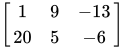
An  matrix is a rectangular array of elements arranged in
  rows and
  columns.
The elements in a matrix can be numbers, symbols, or mathematical expressions. Here is a 2-row, 3-column matrix composed of 6 numerical elements:
Transpose Matrix
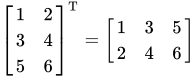
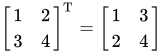
In NumPy, besides using the numpy.transpose function to swap array dimensions, you can also use the T attribute.
For example, if you have an m-row, n-column matrix, using the T attribute will convert it to an n-row, m-column matrix.
Example
import numpy as np

a = np.arange(12).reshape(3,4)
print('Original array:')
print(a)
print('n')
print('Transposed array:')
print(a.T)
The output is as follows:
Original array:
[

 ]

Transposed array:
[


 ]
matlib.empty()
The matlib.empty() function returns a new matrix. The syntax is:
numpy.matlib.empty(shape, dtype, order)Parameter Description:
- shape: An integer or tuple of integers defining the shape of the new matrix.
- dtype: Optional, the data type.
- order: 'C' (row-major) or 'F' (column-major).
Example
import numpy.matlib
import numpy as np

print(np.matlib.empty((2,2)))
The output is:
[[-1.49166815e-154 -1.49166815e-154]
 [ 2.17371491e-313  2.52720790e-212]]
numpy.matlib.zeros()
The numpy.matlib.zeros() function creates a matrix filled with zeros.
Example
import numpy.matlib
import numpy as np

print(np.matlib.zeros((2,2)))
The output is:
[[0. 0.]
 [0. 0.]]
numpy.matlib.ones()
The numpy.matlib.ones() function creates a matrix filled with ones.
Example
import numpy.matlib
import numpy as np

print(np.matlib.ones((2,2)))
The output is:
[[1. 1.]
 [1. 1.]]
numpy.matlib.eye()
The numpy.matlib.eye() function returns a matrix with ones on the diagonal and zeros elsewhere.
numpy.matlib.eye(n, M, k, dtype)Parameter Description:
- n: Number of rows in the returned matrix.
- M: Number of columns in the returned matrix, defaults to n.
- k: Index of the diagonal.
- dtype: Data type.
Example
import numpy.matlib
import numpy as np

print(np.matlib.eye(n = 3, M = 4, k = 0, dtype = float))
The output is:
[[1. 0. 0. 0.]
 [0. 1. 0. 0.]
 [0. 0. 1. 0.]]
numpy.matlib.identity()
The numpy.matlib.identity() function returns an identity matrix of a given size.
An identity matrix is a square matrix where all elements on the main diagonal (from the top-left to the bottom-right) are 1, and all other elements are 0.
Example
import numpy.matlib
import numpy as np

print(np.matlib.identity(5, dtype = float))
The output is:
[[1. 0. 0. 0. 0.]
 [0. 1. 0. 0. 0.]
 [0. 0. 1. 0. 0.]
 [0. 0. 0. 1. 0.]
 [0. 0. 0. 0. 1.]]
numpy.matlib.rand()
The numpy.matlib.rand() function creates a matrix of a given size, filled with random data.
Example
import numpy.matlib
import numpy as np

print(np.matlib.rand(3,3))
The output is:
[[0.23966718 0.16147628 0.14162   ]
 [0.28379085 0.59934741 0.62985825]
 [0.99527238 0.11137883 0.41105367]]
Matrices are always two-dimensional, while ndarray is an n-dimensional array. The two objects are interchangeable.
Example
import numpy.matlib
import numpy as np

i = np.matrix('1,2;3,4')
print(i)
The output is:
[
 ]
Example
import numpy.matlib
import numpy as np

j = np.asarray(i)
print(j)
The output is:
[
 ]
Example
import numpy.matlib
import numpy as np

k = np.asmatrix(j)
print(k)
The output is:
[
 ]
The following functions also exist in the NumPy namespace, but they return matrix objects.
| Function Name | Parameter Description | Function Description |
|---|---|---|
| matrix(data[, dtype, copy]) | data: array-like or string, dtype: data type, copy: whether to copy | Creates a matrix object from an array or string. |
| asmatrix(data[, dtype]) | data: input data, dtype: data type (optional) | Converts input to a matrix object. |
| bmat(obj[, ldict, gdict]) | obj: string or nested sequence, ldict, gdict: namespace dictionaries (optional) | Constructs a matrix from a string, nested sequence, or array. |
| empty(shape[, dtype, order]) | shape: shape, dtype: data type, order: storage order | Creates a matrix with uninitialized elements. |
| zeros(shape[, dtype, order]) | shape: shape, dtype: data type, order: storage order | Creates a matrix filled with zeros. |
| ones(shape[, dtype, order]) | shape: shape, dtype: data type, order: storage order | Creates a matrix filled with ones. |
| eye(n[, M, k, dtype, order]) | n: number of rows, M: number of columns, k: diagonal offset, dtype: data type, order: storage order | Creates a matrix with ones on the diagonal and zeros elsewhere. |
| identity(n[, dtype]) | n: size, dtype: data type (optional) | Creates an identity square matrix. |
| repmat(a, m, n) | a: array or matrix, m, n: repetition counts | Repeats an array or matrix m times along rows and n times along columns. |
| rand(*args) | args: specify matrix shape | Generates a random matrix with uniform distribution of the specified shape. |
| randn(*args) | args: specify matrix shape | Generates a random matrix with standard normal distribution of the specified shape. |
Notes
- Although
numpy.matlibis convenient, NumPy officially recommends usingndarrayand the@operator for matrix operations, as thematrixtype has some limitations and may be deprecated in future versions. - For new code, it is recommended to prioritize using
ndarrayto ensure better compatibility and flexibility.