 YouTip
Cookie is a text file stored on a client computer that retains various tracking information.
Identifying a returning user involves three steps:
- The server script sends a set of cookies to the browser. For example: name, age, or identification number, etc.
- The browser stores this information on the local computer for future use.
- When the browser sends any request to the web server next time, it sends these cookie information to the server, which will use this information to identify the user.
HTTP is a "stateless" protocol, meaning that each time a client retrieves a web page, the client opens a separate connection to the web server, and the server automatically does not retain any records of previous client requests.
However, there are still the following three ways to maintain a session between the web client and the web server:
Cookies
A web server can assign a unique session ID as a cookie for each web client, which can be used to identify the client in subsequent requests.
In web development, sessions are used for session tracking, and sessions rely on cookie technology at the bottom.
Cookie Syntax in Django
Setting a cookie:
rep.set_cookie(key,value,...)
rep.set_signed_cookie(key,value,salt='encryption salt',...)
Getting a cookie:
request.COOKIES.get(key)Deleting a cookie:
rep = HttpResponse || render || redirect
rep.delete_cookie(key)
Creating Application and Model
models.py
class UserInfo(models.Model):
    username = models.CharField(max_length=32)
    password = models.CharField(max_length=64)
urls.py
from django.contrib import admin
from django.urls import path
from cookie import views

urlpatterns = [
    path('admin/', admin.site.urls),
    path('login/', views.login),
    path('index/', views.index),
    path('logout/', views.logout),
    path('order/', views.order)
]
views.py
def login(request):
    if request.method == "GET":
        return render(request, "login.html")
    username = request.POST.get("username")
    password = request.POST.get("pwd")
    user_obj = models.UserInfo.objects.filter(username=username, password=password).first()
    print(user_obj.username)
    if not user_obj:
        return redirect("/login/")
    else:
        rep = redirect("/index/")
        rep.set_cookie("is_login", True)
        return rep

def index(request):
    print(request.COOKIES.get('is_login'))
    status = request.COOKIES.get('is_login')  # Receive the browser's request again, check if the cookie carried by the browser is the one responded to upon successful login
    if not status:
        return redirect('/login/')
    return render(request, "index.html")

def logout(request):
    rep = redirect('/login/')
    rep.delete_cookie("is_login")
    return rep  # Execute after clicking logout, delete the cookie, no longer save the user state, and pop up to the login page

def order(request):
    print(request.COOKIES.get('is_login'))
    status = request.COOKIES.get('is_login')
    if not status:
        return redirect('/login/')
    return render(request, "order.html")
Next, create three template files: login.html, index.html, order.html.
login.html
<!DOCTYPE html>
<html lang="en">
<head>
    <meta charset="UTF-8">
    <title>Title</title>
</head>
<body>
<h3>User Login</h3>
<form action="" method="post">
    {% csrf_token %}
    <p>Username: <input type="text" name="username"></p>
    <p>Password: <input type="password" name="pwd"></p>
    <input type="submit">
</form>
</body>
</html>
index.html
<!DOCTYPE html>
<html lang="en">
<head>
    <meta charset="UTF-8">
    <title>Title</title>
</head>
<body>
<h2>Index Page...</h2>
<a href="/logout/">Logout</a>
</body>
</html>
order.html
<!DOCTYPE html>
<html lang="en">
<head>
    <meta charset="UTF-8">
    <title>Title</title>
</head>
<body>
<h2>Order Page...</h2>
<a href="/logout/">Logout</a>
</body>
</html>
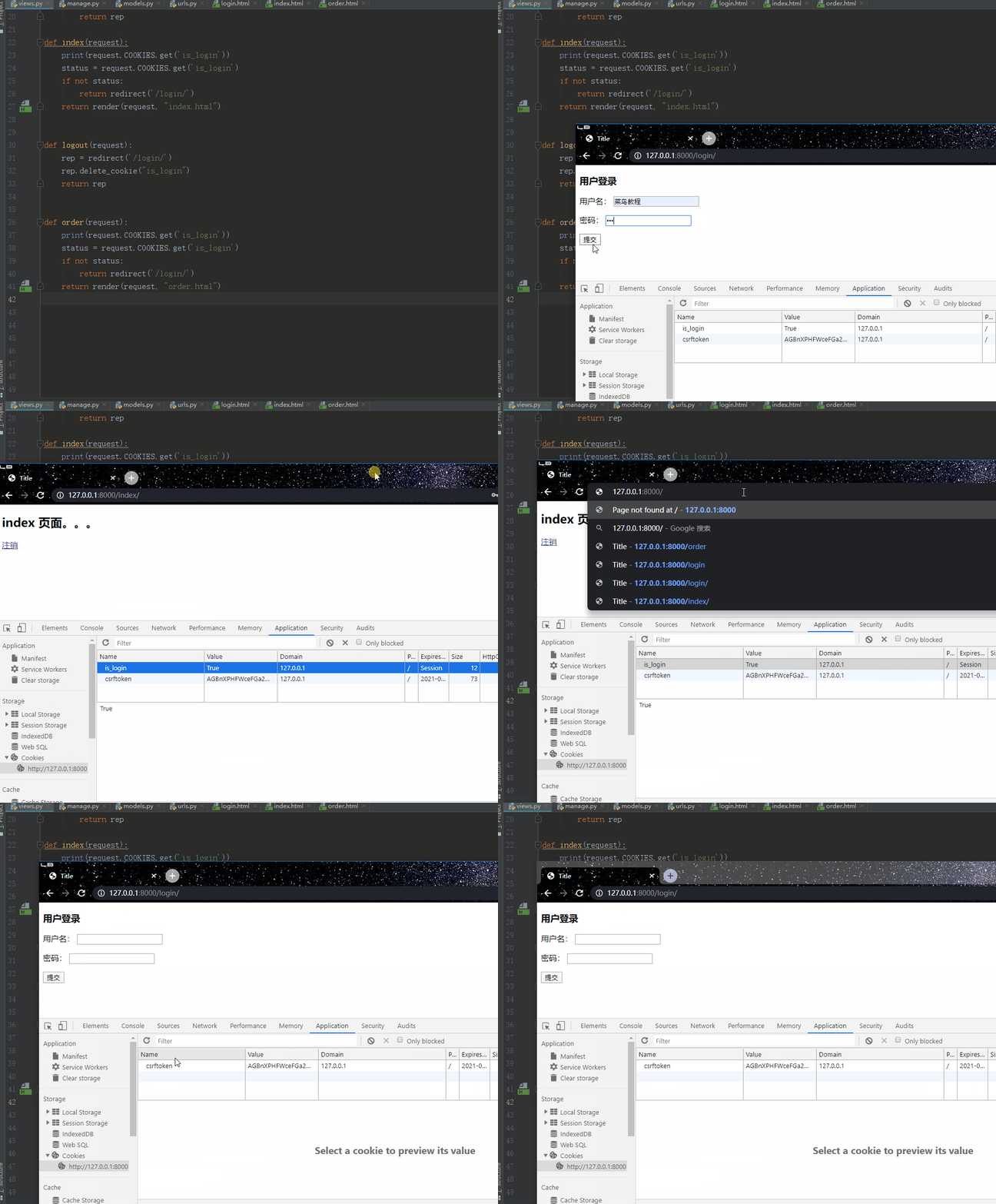
The running result is shown in the figure below:
Session (Key-value pairs stored on the server)
When the server is running, it can create a unique session object for each user's browser. Since the session is exclusive to the user's browser, when the user accesses web resources on the server, they can put their respective data in their own session. When the user accesses other web resources on the server again, other web resources can retrieve data from the user's session to serve the user.
Working Principle
- a. The browser requests the login page for the first time.
- b. The browser sends a second request with the account and password. If the input is correct, the server responds to the browser with an index page and a cookie with the key `sessionid` and a random string as the value, i.e., `set_cookie("sessionid", random_string)`.
- c. The server internally records a piece of data in the `django.session` table.
The `django.session` table has three fields:
- `session_key`: Stores the random string, i.e., the value corresponding to the `sessionid` key in the cookie responded to the browser.
- `session_data`: Stores the user's information, i.e., multiple `request.session = value`, and it is encrypted.
- `expire_date`: Stores the expiration time of this record (default 14 days).
- d. When the browser requests other resources for the third time, it carries the cookie: `{sessionid: random_string}`. The server retrieves the user's data from the `django.session` table based on this random string for use (i.e., saving the state).
Note: The `django.session` table stores the browser's information, not each user's information. Therefore, multiple user requests from the same browser only save one record (later overwrites earlier), and multiple browser requests save multiple records.
Cookies compensate for the statelessness of HTTP, letting the server know "who" is coming. However, cookies are saved in the browser in text form, have poor security, and support a maximum of only 4096 bytes. Therefore, different users are identified only through cookies, and then private information and text exceeding 4096 bytes are saved in the corresponding session.
Session setting:
request.session = valueExecution steps:
- a. Generate a random string.
- b. Save the random string and the set key-value pair into the `session_key` and `session_data` of the `django_session` table.
- c. Set the cookie: `set_cookie("sessionid", random_string)` and respond to the browser.
Session retrieval:
request.session.get('key')Execution steps:
- a. Get the value of the `sessionid` key from the cookie, i.e., the random string.
- b. Filter the record from the `django_session` table based on the random string.
- c. Retrieve the data from the `session_data` field.
Session deletion, deleting the entire record (including the three fields `session_key`, `session_data`, `expire_date`):
request.session.flush()Deleting a specific key-value pair in `session_data`:
del request.sessionExecution steps:
- a. Get the value of the `sessionid` key from the cookie, i.e., the random string.
- b. Filter the record from the `django_session` table based on the random string.
- c. Delete the filtered record.
Example
Create routes:
urls.py
from session import views as session_views

urlpatterns = [
    path('session_login/', session_views.login),
    path('s_index/', session_views.s_index),
    path('s_logout/', session_views.s_logout),
]
Create view functions:
views.py
def login(request):
    if request.method == "GET":
        return render(request, "login.html")
    username = request.POST.get("username")
    password = request.POST.get("pwd")
    user_obj = models.UserInfo.objects.filter(username=username, password=password).first()
    print(user_obj.username)
    if not user_obj:
        return redirect("/session_login/")
    else:
        request.session['is_login'] = True
        request.session['user1'] = username
        return redirect("/s_index/")

def s_index(request):
    status = request.session.get('is_login')
    if not status:
        return redirect('/session_login/')
    return render(request, "s_index.html")

def s_logout(request):
    # del request.session  # Delete a key-value pair in session_data
    request.session.flush()  # Delete a record including the three fields (session_key, session_data, expire_date)
    return redirect('/session_login/')
Template file:
s_index.html
<!DOCTYPE html>
<html lang="en">
<head>
    <meta charset="UTF-8">
    <title>Title</title>
</head>
<body>
<h2>Session Index Page... {{ request.session.user1 }}</h2>
<a href="/s_logout/">Logout</a>
</body>
</html>
The running result is shown in the figure below: